


-
Sliding Background Image Menu with jQuery
a submenu will slide out from the bottom. This menu comes with some configuration possibilities, such as the size of the image, the hover effect and custom default states.
-
 Chop Slider :: CSS3 animation
This awesome slider with a chopping effect was last updated on June 20, 2011. The ChopSlider uses full power of CSS3 animation
-
Sliding Letters with jQuery
the standard hover effect by playing around with the letters in an anchor word. The aim is to slide in letter by letter when hovering over a link element.
-
 PIROBOX EXTENDED V.1.0 - jQuery plugin
Browser compatibility = FireFox 2+, Opera9.5+, Chrome, Safari (Mac/Windows),IE 7+, Pirobox can be fun and usefull for you. Enjoy the code with jQuery
-
Advanced jQuery Full screen background image slideshow
Start up your HTML/CSS/jQuery editor and let's see how you can create this effect yourself!
Monday, June 27, 2011
Chop Slider :: CSS3 animation


Thursday, June 16, 2011
How to Make All Browsers Render HTML5 Mark-up Correctly – Even IE6

Friday, May 13, 2011

Collapsing Site Navigation with jQuery
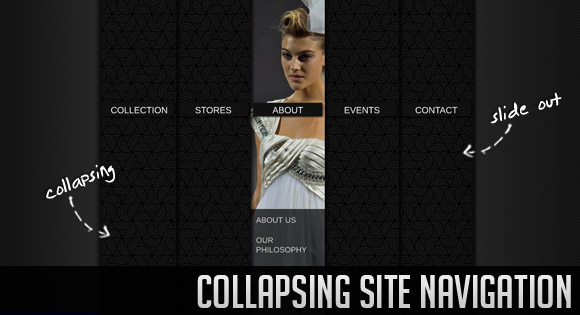
A collapsing menu that contains vertical navigation bars and a slide out content area. When hovering over a menu item, an image slides down from the top and a submenu slides up from the bottom. Clicking on one of the submenu items will make the whole menu collapse like a card deck and the respective content area will slide out.
Sunday, May 1, 2011
Embed fonts into CSS using Google Web Fonts API

Google Web Fonts lets you browse all the fonts available via the Google Web Fonts API. All fonts in the directory are available for use on your website under an open source license and are served by Google servers.
Google Web Fonts are a great way to get started using new typefaces on the web without paying for a service like Typekit.

Google Web Fonts is the best way to add amazing new free fonts to your site. Google web fonts are web safe fonts, which can be added to any site by adding a few simple lines of code to your html.
Enthused by the new font technology and with the intention to improve our web design fonts, we tested out the Google web fonts. And it was much easier than I thought and was compatible with most web browsers.
Try Google web fonts, as there are some really amazing web fonts out there and amaze your readers. You can add as many free web fonts as you like. Which is your favorite Google web font?
Sunday, April 24, 2011
Sliding Panel Photo Wall Gallery with jQuery

The idea is to have a whole page full of thumbs with a nice light effect when we hover. When an image is clicked, a panel slides up from the bottom revealing the full picture. When clicking on the full image, the thumbs panel slide back from the bottom. This effect will give the impression that we are stacking the panels on top of each other every time we change the mode. In the full picture view we add some nice transition effect when we browse through the photos.
In addition, we will use a function for resizing the full image, adapting it to the size of the screen. So, when the screen get’s resized, our image will adapt automatically!css3 JQuery Animated Tabs
 Tabs is used for utilizing space and keep some stylish effects on website. jQuery tabs are very popular and it created some fancy look on web pages. I created a simple in use but a fancy looking jquery and css based tabs to give you and example. I used css to make it in some rounded style. Its doesnt work for IE but its fine in Firefox and Chrome.
Subscribe to:
Posts (Atom)